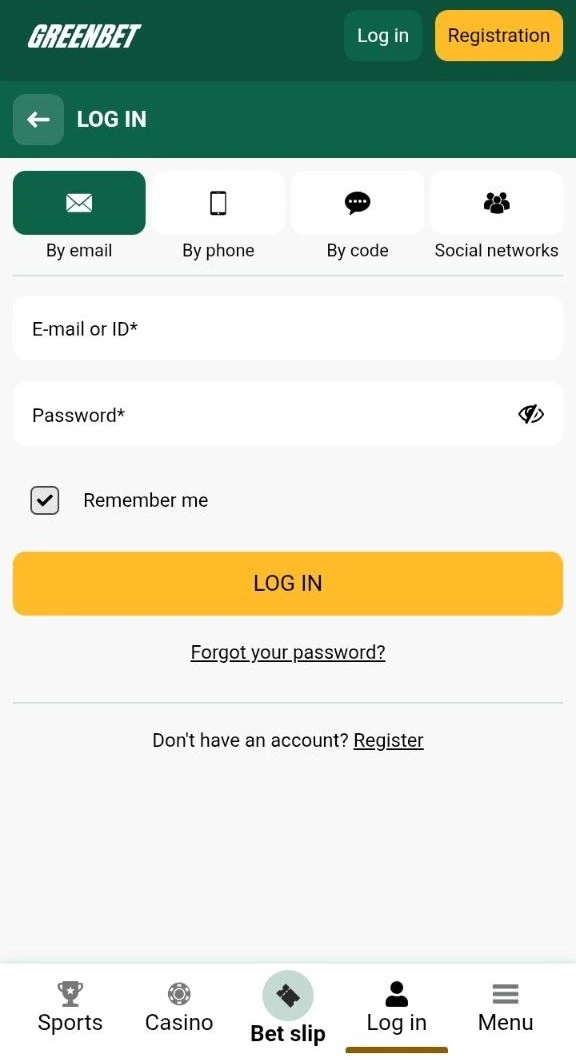
Login Methods
Greenbet has four login tabs: By email, By phone, By code and Social networks. All four open the same account. The method you can use depends on how you registered and whether your phone number is verified.
To open the login form, press the LOG IN button in the top right corner of greenbet.gg. The form opens with the By email tab active.
| Login tab | What you enter | Password needed | Main condition |
|---|---|---|---|
| By email | Email or account ID, password | Yes | Email or ID linked to the account |
| By phone | Country code, phone number, password | Yes | Phone number linked to the account |
| By code | Country code, phone number, sending method | No | Phone number verified by SMS |
| Social networks | Telegram, Google or X account | No | Account created through the same network |
Swipe to see more columns
The review team checked all four tabs. Each tab has a dark green icon above its label. The active tab turns solid green. Under the form, every tab shows the same line: "Don't have an account? Register". This link takes you to registration if you have not created an account yet.
Email or ID Login
Email or ID login uses one field for two kinds of data. You can type your email address or your numeric account ID. Then you add your password.
- Press LOG IN in the top right corner.
- Stay on the By email tab.
- Enter your email or account ID in the "E-mail or ID" field.
- Enter your password.
- Press the yellow LOG IN button.
The account ID is the main login for players who registered with the One-click method. This method does not ask for an email at signup. Save your ID and password right after registration.
The password field has an eye icon on the right edge. A click on it shows the password in plain text. Use it to check for typing errors before you press LOG IN. The "Remember me" checkbox was ticked by default. It keeps you logged in on this device.
Phone Number Login
Phone number login works with your mobile number and your password. Use it if you registered with the By phone method.
- Open the login form and select the By phone tab.
- Check the country code on the left side of the field.
- Enter your phone number without the country code.
- Enter your password.
- Press LOG IN.
The country code field has a small flag and a drop-down arrow. During the review, the form showed the Kenyan flag and the code +254. The site picks a default code. Check it before you type the number. A wrong code is a common reason for a failed login.
Code-Based Login
Code-based login lets you enter the account without a password. Greenbet sends a one-time code to your phone. The code goes only to a verified number.
A verified number is a phone number that you confirmed with an SMS code in your profile. Greenbet shows this rule directly in the form: "The code can only be sent to a verified number".
- Open the login form and select the By code tab.
- Check the country code and enter your phone number.
- Leave SMS in the "Sending method" field.
- Press "Send via SMS".
- Enter the code from the message.
The "Send via SMS" button looked pale green in the form. It differs from the bright yellow LOG IN button on the other tabs. This tab has no password field and no "Forgot your password?" link. It is the fastest way back into the account if you forgot your password.
Social Network Login
Social network login uses your Telegram, Google or X account. Greenbet does not ask for a password in this case.
- Open the login form and select the Social networks tab.
- Choose Telegram, Google or X.
- Confirm the login in the window of the selected service.
This method works for accounts created through the same network. If you registered by email, use the email tab. The public Greenbet information does not say whether you can link a social network to an existing account.
Password Recovery
To recover a Greenbet password, click "Forgot your password?" under the LOG IN button. The link appears only on the By email and By phone tabs.
- Press LOG IN on greenbet.gg.
- Select the By email or By phone tab.
- Click "Forgot your password?".
- Follow the instructions on the screen.
- Create a new password and log in.
A verified phone number gives you a second option. Open the By code tab and request an SMS code. You enter the account without the old password. After that, you can set a new one in the Security section of the account menu.
| Situation | What to do |
|---|---|
| You have access to your email or phone | Use the "Forgot your password?" link |
| Your phone number is verified | Log in by SMS code and change the password |
| You registered through Telegram, Google or X | Log in with the same network; no Greenbet password is needed |
| You lost access to email and phone | Write to [email protected] |
Troubleshooting
Most Greenbet login problems have three causes. These are wrong login data, a blocked account and an unverified phone number. Each of them has its own solution.
Failed Login Attempts
A failed login usually means the data does not match the selected tab. The table shows the typical errors.
| Error | Cause | Solution |
|---|---|---|
| Wrong email or password | Typing error or wrong keyboard layout | Use the eye icon to check the password |
| Account not found | Email entered on the phone tab, or the reverse | Switch to the tab that matches your data |
| ID does not work | ID typed in the phone field | Enter the ID on the By email tab |
| Phone number not recognised | Wrong country code | Check the flag and code next to the number |
| Social login opens a new account | Account was created by email | Use the By email tab |
If you still cannot log in, reset the password. Do not try many passwords in a row. Repeated attempts are a common reason for extra security checks.
Account Lockout Resolution
A blocked Greenbet account is restored only through the security team. Write to [email protected]. Explain the problem and add your account ID or email.
The Greenbet terms list several reasons for account closure or blocking:
- More than one account per person, family, address, shared computer or IP address.
- Bonus abuse according to the review of transaction records.
- Failure to provide KYC documents on request.
- Suspected fraud or money laundering. In this case Greenbet can also freeze the balance.
KYC means "know your customer". It is an identity check with ID documents. Greenbet can also ask for a photo of you holding your ID with your face clearly visible. Prepare these documents before you contact support. This shortens the review of your case.
Verification Code Not Received
An SMS code does not arrive in most cases because the number is not verified. Greenbet sends login codes only to verified numbers.
- Make sure your number was confirmed by SMS in your profile.
- Check the country code in front of the number.
- Check that your phone has network coverage and can receive SMS.
- Request the code again after a short pause.
- If the code still does not arrive, log in with email or phone and password.
If your number is not verified, log in with a password first. Then confirm the number in the Personal profile section. After that, the By code tab works for your account.
Security
Greenbet account security depends on your password, the "Remember me" setting and your verified contact data. The account menu has a separate Security section.
In the review, the account menu showed red exclamation marks next to Deposit, Personal profile and Security. These marks show sections that need your attention. Open Security and Personal profile after the first login.
Several simple rules protect your account:
- Use a unique password that you do not use on other sites.
- Untick "Remember me" on shared computers.
- Verify your phone number to keep code login and password recovery available.
- Do not share your account ID and password with other people.
- Write to [email protected] if you notice activity you did not make.
Two-Factor Authentication
Two-factor authentication (2FA) is a login method that asks for a second code in addition to your password. The code usually comes from an authenticator app or SMS. It protects the account even if someone learns your password.
The public Greenbet information does not describe a 2FA option. The account menu has a Security section. Open it to check which protection options are available for your account. Login by SMS code works only with your verified phone, so it adds a layer of protection. It does not replace 2FA.
Mobile Access
On mobile devices, Greenbet login works the same way as on the website. The Android app and the iOS web app show the same four login tabs.
| Platform | App format | Login methods |
|---|---|---|
| Android | APK from the official website | Email or ID, phone, code, social networks |
| iOS | Progressive web app via Safari | Email or ID, phone, code, social networks |
One account works on all devices. You do not need a separate account for the app.
Android Application Login
On Android, you log in through the Greenbet app installed from an APK file. An APK is an installation file for Android apps. Greenbet distributes it only through its website.
- Download the APK from the official Greenbet website.
- Allow installation from unknown sources in Settings.
- Install the app and open it.
- Press LOG IN and select one of the four tabs.
- Enter your data and press LOG IN.
Keep "Remember me" ticked if the phone belongs only to you. You then skip the login form on the next launch.
iOS Progressive Web Application Login
On iPhone and iPad, Greenbet works as a progressive web app (PWA). A PWA is a website that you save to the home screen. It opens with its own icon, like a regular app.
- Open greenbet.gg in Safari and wait until the page loads completely.
- Press Share and select "Add to Home Screen".
- Press Add in the upper right corner.
- Open the Greenbet icon on the home screen.
- Press LOG IN and enter your data.
The web app uses the same login form as the mobile site. Code login is useful here. The SMS arrives on the same iPhone, so you can copy the code in a few seconds.
Frequently Asked Questions
Below are short answers to common questions about Greenbet login.
What Are the Greenbet Login Options?
Greenbet offers four options. You can log in with email or ID, with a phone number and password, with an SMS code, or through Telegram, Google or X.
How Do I Recover My Greenbet Login Password?
Click "Forgot your password?" on the By email or By phone tab and follow the instructions. With a verified number you can also log in by SMS code and change the password.
Why Is My Greenbet Login Not Working?
The most common reasons are a wrong tab, a wrong country code or a typo in the password. A blocked account is restored through [email protected].
How Do I Log In to Greenbet Using a Code?
Open the By code tab, enter your verified phone number and press "Send via SMS". Then enter the code from the message.
Can I Log In to Greenbet Through Social Networks?
Yes. Telegram, Google and X work for accounts created through the same network.
How Do I Log In to Greenbet on Mobile?
Open the Android app or the iOS web app and press LOG IN. The same four login methods are available.
How Do I Contact Greenbet Support for Login Issues?
Use the live chat icon on the website or write to [email protected]. Questions about blocked accounts go to [email protected].
Is Two-Factor Authentication Available for Greenbet Login?
The public Greenbet information does not describe 2FA. Check the Security section in your account menu for the available options.