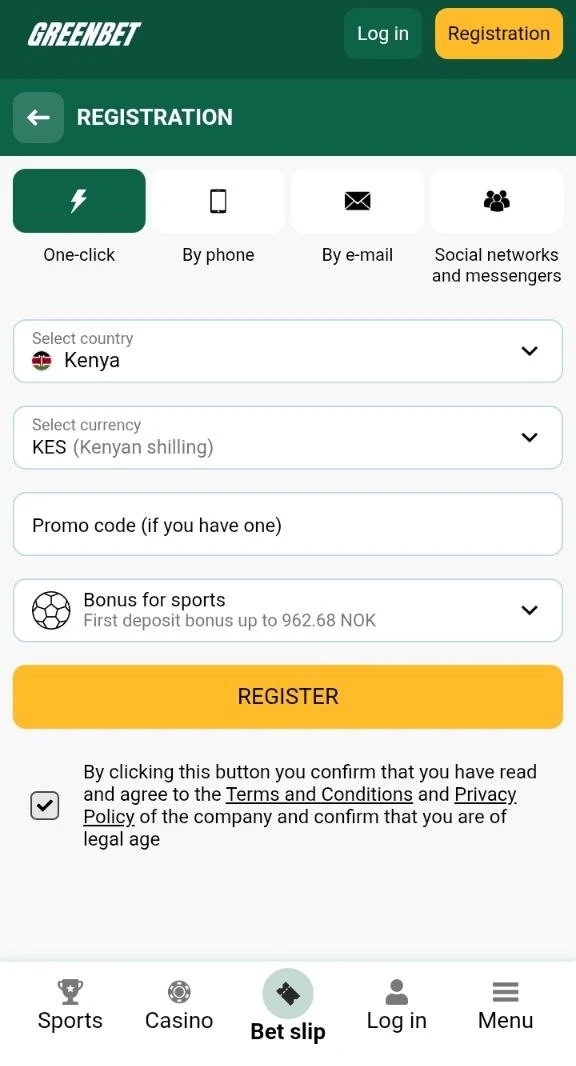
Registration Methods
Greenbet offers four registration methods: One-click, By phone, By e-mail, and Social networks and messengers. Each method is a separate tab at the top of the registration form.
To open the form, press the yellow REGISTRATION button in the top right corner of greenbet.gg. The homepage also has a small registration widget on the right side. This widget shows only two tabs, One-click and By phone. The full registration page shows all four.
| Method | Data at signup | SMS code at signup | Number of steps |
|---|---|---|---|
| One-click | Country, currency | No | 1 |
| By phone | Phone number, currency | Yes | 1 plus SMS code |
| By e-mail | First name, surname, email and more | No | 3 |
| Social networks | Telegram, Google or X account, country, currency | No | 1 plus confirmation in the network |
Swipe to see more columns
All methods share three fields. These are the promo code, the bonus type and the consent checkbox. The checkbox confirms that you accept the Terms and Conditions and the Privacy Policy. It also confirms that you are of legal age.
The review team noticed one difference between the two forms. On the homepage widget the consent checkbox was empty by default. On the full registration page it was already ticked. If you register from the homepage, tick the box before you press REGISTER.
One-Click Registration
One-click registration creates an account with only a country and a currency. It is the shortest method at Greenbet.
- Press REGISTRATION and stay on the One-click tab.
- Check the country in the "Select country" field.
- Check the currency in the "Select currency" field.
- Enter a promo code if you have one.
- Choose the bonus type.
- Press REGISTER.
During the review, the form showed Kenya and KES (Kenyan shilling) as preselected values. The homepage widget showed Norway and NOK. Always check both fields before you press REGISTER.
This method does not ask for an email or a phone number. You log in later with your account ID and password. Save them right after registration. Without them, recovery of access is harder.
Phone Number Registration
Phone number registration creates an account linked to your mobile number. Greenbet confirms the number with an SMS code during signup.
- Open the By phone tab.
- Check the country code on the left side of the number field.
- Enter your phone number.
- Leave SMS in the "Sending method" field.
- Press "Send via SMS" and enter the code from the message.
- Choose the currency, the promo code and the bonus type.
- Press REGISTER.
The country code field has a small flag and a drop-down arrow. In the review, it showed the Kenyan flag and +254. A wrong country code is the most common reason why the SMS does not arrive.
Email Registration
Email registration takes three steps. The first step asks for your first name, surname and email address.
- Open the By e-mail tab.
- Enter your first name in the "First name" field.
- Enter your surname in the "Surname" field.
- Enter your email address.
- Press the yellow NEXT button.
- Complete steps 2 and 3 of the form.
A progress bar with three dots and the label "Step 1 of 3" shows where you are. A grey BACK button lets you return to the previous step.
Below the email field, Greenbet shows a hint with an exclamation icon. The site recommends a Gmail address. Other mail services may not deliver Greenbet notifications reliably.
Social Network Registration
Social network registration uses your Telegram, Google or X account. You do not create a separate Greenbet password.
- Open the "Social networks and messengers" tab.
- Choose Telegram, Google or X.
- Select the country and the currency.
- Enter a promo code if you have one.
- Choose the bonus type and press REGISTER.
- Confirm access in the window of the selected service.
Later you log in through the same network. Keep access to that Telegram, Google or X account. If you lose it, you lose the easiest way back into Greenbet.
Registration Form Fields
The Greenbet registration form has fields for country, currency, promo code and bonus type. The phone and email methods add personal data fields.
| Field | One-click | By phone | By e-mail | Social networks |
|---|---|---|---|---|
| Country | Yes | Through the country code | Not on step 1 | Yes |
| Currency | Yes | Yes | Not on step 1 | Yes |
| Phone number | No | Yes | No | No |
| Name and email | No | No | Yes | From the network |
| Promo code | Yes | Yes | Not on step 1 | Yes |
| Bonus type | Yes | Yes | Not on step 1 | Yes |
Swipe to see more columns
Country and Currency Selection
Country and currency are selected in two drop-down fields at the top of the form. The currency becomes the currency of your account balance.
Greenbet shows bonus amounts in the account currency. In the review, the form displayed the sports bonus in NOK. In this guide, the amounts are given as USD equivalents.
Choose the currency carefully. Bonuses are disabled for cryptocurrency accounts without exception. If you want a welcome bonus, select a regular currency.
Personal Information Requirements
Greenbet needs your personal information to credit bonuses and to confirm your identity. One-click and social registration skip these fields at signup. You fill them in later in the Personal profile section.
The Greenbet terms list the fields that must be filled in:
- Full name.
- Mobile phone number, activated by SMS.
- Email address.
- Country of residence.
Enter real data that matches your ID documents. Greenbet may compare your profile with your documents during an identity check. A mismatch can lead to the loss of bonuses and winnings.
One person, family, address, shared computer or IP address can have only one bonus account. The same applies to email, bank card and payment account details. A second account can lead to account closure.
Promo Code Application
A promo code is a combination of letters and numbers that can unlock an extra offer. Greenbet has a separate field for it in the registration form.
The field reads "Promo code (if you have one)". It is optional. You can register without a code. Enter the code exactly as written, with no spaces before or after it.
Enter the promo code at signup. The registration form is the place where Greenbet asks for it.
Bonus Selection at Registration
The Greenbet registration form asks you to choose one of three bonus options: Bonus for sports, Casino + Games or Reject bonuses. Greenbet credits the selected bonus after your first deposit.
| Option | Offer | Wagering | Validity |
|---|---|---|---|
| Bonus for sports | 100% up to $100 on the first deposit | x5 in accumulator bets | 30 days from registration |
| Casino + Games | Up to $1,750 + 150 free spins over four deposits | x35 per deposit bonus | 7 days per bonus |
| Reject bonuses | No welcome bonus | Not applicable | Not applicable |
Swipe to see more columns
The bonus field has a drop-down arrow on the right side. A click on it opens a separate Bonuses window with all three options. A white circle marks the selected option on a dark green background.
You can join other Greenbet promotions with either bonus type. Deposit offers that require bets of one type are an exception.
Sports Bonus Option
The sports bonus gives 100% on your first deposit up to $100. The minimum deposit for the bonus is $1.
You wager the bonus five times in accumulator bets. An accumulator is one bet on several events. It wins only if all selected events win.
- Each accumulator must have at least 3 selections.
- At least 3 selections must have odds of 1.40 or higher.
- Handicap bets, total bets and refunded bets do not count.
- The wagering counts only after all bets are settled.
- The bonus expires 30 days after registration.
After the wagering, Greenbet moves the remaining bonus funds to your main balance. The transfer is limited to the original bonus amount.
Casino and Games Bonus Option
The Casino + Games option gives a welcome package for the first four deposits. The total value reaches $1,750 and 150 free spins.
| Deposit | Bonus | Maximum bonus | Free spins | Minimum deposit | Free spin game |
|---|---|---|---|---|---|
| 1st | 100% | $375 | 30 | $10 | Reliquary of Ra |
| 2nd | 50% | $425 | 35 | $15 | Admiral |
| 3rd | 25% | $450 | 40 | $15 | Juicy Fruits 27 Ways |
| 4th | 25% | $500 | 45 | $15 | Rich of the Mermaid Hold and Spin |
Swipe to see more columns
Each bonus has a x35 wagering requirement within 7 days. This means you must bet 35 times the bonus amount. The maximum stake during wagering is $5. Bets in the Games section count twice. Blackjack bets count once. Some games do not count at all, for example Roulette and Crash.
Free spins become available after the deposit bonus is wagered. The next deposit bonus comes only after the previous one is wagered or has expired.
Bonus Rejection Consequences
If you select Reject bonuses, you lose access to all other Greenbet promotions. The option shows the note "Make your choice later". The information block under the options states the main rule. Rejecting bonuses means rejecting all other promotions.
Switching also has consequences. The table shows what happens in each case.
| Action | Result |
|---|---|
| You select Reject bonuses | No welcome bonus and no other promotions |
| You switch from sports to casino or back | You lose the right to the next deposit bonuses of the welcome package |
| You receive a bonus of the other type | You lose the right to future welcome deposit bonuses |
| You decline participation in bonus offers | You lose the welcome package and the tenth deposit bonus |
Decide on the bonus type before the first deposit. Players who mostly bet on sports benefit from the sports bonus. Players who mostly play slots benefit from the casino package.
Account Activation
A Greenbet account is fully active after three steps: profile completion, phone verification and the first deposit. Only then does the welcome bonus arrive.
In the review, a new account showed red exclamation marks in the account menu. They appeared next to Deposit, Personal profile and Security. These marks point to sections that still need your data.
- Fill in all fields in Personal profile.
- Confirm your phone number by SMS.
- Opt in to bonus offers in Account Settings or on the Deposit page.
- Make your first deposit.
Profile Completion Requirements
Greenbet credits a bonus only if all profile fields are filled in. Open Personal profile in the account menu after registration.
SMS verification is part of the profile. It confirms that the phone number belongs to you. Greenbet sends a one-time code to your number. You enter it on the site.
A verified number affects three features:
- Automatic crediting of the welcome bonus after the first deposit.
- Login by SMS code without a password.
- Free spins in the casino offers.
First Deposit Activation
The first deposit triggers the welcome bonus. Greenbet credits the bonus automatically if your profile is complete and your number is verified.
Before you pay, opt in to bonus offers. You can do it in Account Settings or directly on the Deposit page. The minimum first deposit is $1 for the sports bonus. It is $10 for the casino package.
During the review, the Deposit page showed 37 methods. All of them were cryptocurrencies, for example Bitcoin, Ethereum, Tether on Tron and Litecoin. The official site information also mentions Greenbet betting shops, WebMoney and Qiwi. Availability depends on your country.
All types of Greenbet bonuses are disabled for cryptocurrencies, without exception. A crypto deposit does not activate the welcome bonus.
Identity Verification Submission
Greenbet requests identity verification (KYC) when necessary. KYC means "know your customer". It is a check that confirms the account belongs to a real person.
| Request type | What Greenbet asks for |
|---|---|
| ID documents | Documents that confirm your identity |
| Photo check | A photo of you holding your ID with your face clearly visible |
| Phone check | Identity verification over the phone |
Greenbet can request these checks at any time. If you do not provide the documents, the bonus and the winnings are cancelled. Follow the instructions in the request. For questions about the check, write to [email protected] or [email protected].
Frequently Asked Questions
Below are short answers to common questions about Greenbet registration.
What Are the Greenbet Registration Options?
Greenbet offers four options. These are One-click, By phone, By e-mail and registration through Telegram, Google or X.
How Do I Register on Greenbet by Phone?
Open the By phone tab, enter your number and press "Send via SMS". Enter the code, choose the currency and bonus, then press REGISTER.
How Do I Register on Greenbet by Email?
Open the By e-mail tab and enter your first name, surname and email. Press NEXT and complete the remaining two steps.
Can I Register on Greenbet Through Social Networks?
Yes. Greenbet supports registration through Telegram, Google and X.
What Bonus Can I Choose During Registration?
You can choose a 100% sports bonus up to $100 or a casino package up to $1,750 with 150 free spins. You can also reject bonuses, but this cancels all other promotions.
How Do I Verify My Phone Number on Greenbet?
Request an SMS code to your number and enter it on the site. With the By phone method, this happens during registration.
What Information Is Required to Complete Greenbet Registration?
Greenbet needs your full name, an activated phone number, an email address and your country of residence. All fields must be filled in to receive bonuses.
How Do I Activate My Greenbet Account After Registration?
Complete your profile, verify your phone by SMS and opt in to bonus offers. Then make your first deposit in a regular currency.